Author: Khizer Adil

  • The Multi-Channel Client Acquisition Framework: How to Scale Your Service Business

    The Multi-Channel Client Acquisition Framework: How to Scale Your Service Business

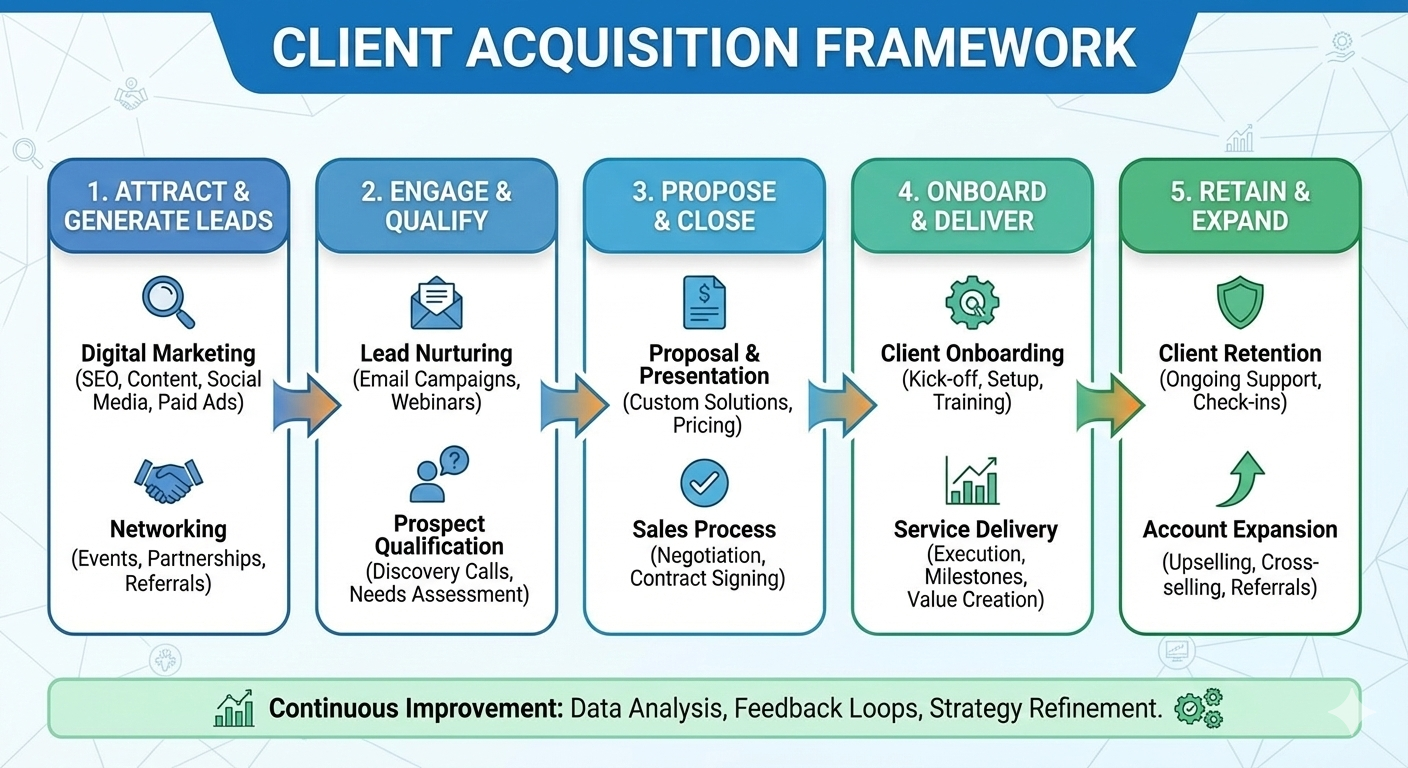
    Finding clients is the #1 challenge for freelancers, agencies, and consultants. Most people rely on “hope marketing”—praying for a referral to drop into their inbox. To build a sustainable business, you need a diversified ecosystem. You need a mix of inbound authority, outbound hustle, and strategic scaling. Here is the definitive framework for client acquisition, broken down into three core pillars.

    1. Digital Strategies: Building Your Inbound Engine

    Digital strategies are about building your “digital twin”—a version of you that builds trust with prospects while you sleep.

    Build a High-Converting Portfolio: Your portfolio shouldn’t just be a gallery; it should be a collection of case studies. Focus on the results you achieved for previous clients rather than just the tasks you performed.

    LinkedIn Outreach & Authority: LinkedIn is the modern-day boardroom. Don’t just spam DMs. Optimize your profile to solve a specific problem, share insights daily, and engage with decision-makers in your niche.

    Content Marketing: By teaching what you know through blogs, videos, or newsletters, you position yourself as an expert. This moves you from “searching for clients” to “being chosen by clients.”

    Freelance Platforms (The Launchpad): Sites like Upwork or Toptal are great for building initial momentum. Use them to gather testimonials, but aim to move high-value relationships into direct contracts over time.

    Online Communities: Be active in Slack channels, Discord servers, and niche Facebook groups. Answer questions without a sales pitch; the leads will follow naturally.

    2. Networking & Outreach: The Human Connection

    Business is, and always will be, built on relationships. These tactics often have the highest conversion rates because they are built on trust.

    The Power of Referrals: A referred lead is 4x more likely to close. Don’t leave this to chance. Implement a formal referral system where you reward past clients or colleagues for successful introductions.

    Local Networking: Never underestimate the power of your local community. Attending local business meetups or Chamber of Commerce events can lead to high-retention clients who value face-to-face trust.

    Personalized Cold Outreach: Cold emailing works if it is warmly personalized. Research the prospect, identify a specific gap in their current strategy, and offer a “quick win” tip before asking for a meeting.

    Strategic Partnerships: Find businesses that serve the same client but offer a different service (e.g., a web designer partnering with an SEO expert). Cross-referring is the fastest way to double your lead flow.

    3. Other Tactics: Scaling and Maximizing Value

    Once you have a foundation, use these levers to accelerate your growth and increase your margins.

    Paid Advertising: If you have a high-ticket offer and a proven sales process, use Google or Meta ads to “pour gasoline on the fire.”

    Strategic Pro-Bono Work: Only do free work if it’s for a “Logo Account”—a brand name that will significantly elevate your credibility or open doors to a brand new industry.

    Upselling Existing Clients: The easiest sale is to someone who has already paid you.

    Regularly audit your current clients’ needs. You can get a monthly retainer, a new feature, or a maintenance package! Get in touch with Khizer Adil and send your quote [email protected]

  • What is SEO & How It Works — an SEO expert’s perspective

    Learn what SEO is, how search engines rank pages, and the practical steps (keyword research, technical fixes, content, links) to grow organic traffic.

    Short answer

    SEO (Search Engine Optimization) is the process of improving a website so search engines understand it, trust it, and rank it higher for queries your customers type. It’s the combination of technical work, content strategy, and reputation-building that drives consistent, organic visitors.

    How SEO works — the simple pipeline

    Crawl — Search engine bots (like Googlebot) discover pages by following links and sitemaps.

    Index — Discovered pages are analyzed and stored in the search engine’s index (a giant library of web content).

    Rank — When someone searches, the engine evaluates indexed pages and orders them based on relevance and quality signals to return the best results.

    The four pillars of modern SEO

    Technical SEO — Makes your site crawlable and indexable. Think site speed, mobile-friendliness, secure HTTPS, robots.txt, XML sitemaps, structured data, and fixing crawl errors.

    On-page SEO — Optimizing individual pages: title tags, meta descriptions, headers, URL structure, image alt text, and keyword-focused, user-first content.

    Content (Topical) SEO — Creating helpful, original content that satisfies user intent. This includes content clusters, pillar pages, FAQs, and multimedia that answers real search queries.

    Off-page SEO (Authority) — Signals from other websites: backlinks, brand mentions, PR, social proof, and citations. High-quality, topical backlinks raise your site’s authority.

    Key ranking signals (what matters most)

    Relevance: How well your content matches the searcher’s intent.

    Authority: Backlinks and brand signals that show other sites trust you.

    User Experience (UX): Page speed, mobile UX, layout, and low bounce rates.

    Content Quality: Depth, originality, freshness, and usefulness.

    Technical health: Proper indexing, no duplicate content, clean crawl paths.

    Practical 8-step SEO workflow I use (so you can publish and rank)

    Goal & audience definition — Define business goals and buyer personas.

    Keyword & intent research — Map queries to stages: informational, commercial, transactional. Pick 1 primary + 2–3 secondary keywords per page.

    Site audit — Fix technical issues (crawl errors, broken links, slow pages, duplicate pages).

    Content plan — Create a topical map: pillar pages, supporting articles, FAQs.

    On-page optimization — Title tag, H1, meta description, internal linking, schema (FAQ/Article).

    Publishing & index request — Publish, submit sitemap, and request indexing if needed.

    Authority building — Outreach, guest posts, partnerships, PR, and natural link earning.

    Measure & iterate — Track organic traffic, keywords, CTR, bounce, and conversions. Improve underperforming pages.

    Common mistakes to avoid

    Targeting broad keywords without matching user intent.

    Thin or duplicated content copied from elsewhere.

    Ignoring mobile performance.

    Focusing only on rankings rather than conversions.

    Buying low-quality links — short-term gain, long-term risk.

    Quick on-page checklist (before you publish)

    Clear, descriptive title tag (50–60 chars) with primary keyword.

    Compelling meta description (120–160 chars) that improves CTR.

    Single H1 that matches intent.

    Readable URL slug (no stop-words, include keyword).

    At least one internal link from a relevant page.

    Mobile-friendly layout and fast LCP (Largest Contentful Paint).

    Add structured data (Article, FAQ) where relevant.

    What to measure (KPIs)

    Organic sessions & users (Google Analytics/GA4)

    Keyword rankings for target keywords

    Click-through rate (CTR) on search results

    Impressions and average position (Search Console)

    Conversions / leads from organic traffic

    Number and quality of referring domains

    Short FAQ (ready for your site)

    Q: How long until I see results?

    A: Typically 3–6 months for noticeable gains on new content, but this varies by competition, site history, and resources invested.

    Q: Do I need to pay for ads if I do SEO?

    A: Paid ads help fast results; SEO builds sustainable organic traffic. Most businesses benefit from a mix.

    Q: Can I do SEO myself?

    A: Yes — with consistency and learning. But complex technical issues and strategic link building often benefit from an experienced specialist.

  • SEO Content Publishing

    SEO content publishing involves a strategic process of creating, optimizing, and promoting valuable, user-focused content (like blog posts, articles) using keywords and technical best practices to rank higher in search engines, attract organic traffic, and meet user intent, requiring keyword research, on-page optimization (headings, images, links), technical setup, and post-publish promotion. 

    Key Steps for SEO Content Publishing

    1. Keyword Research & Planning:

    • Identify relevant keywords your audience searches for, focusing on search intent (what they want to find).
    • Develop a content plan around these topics, aiming for in-depth, helpful content.

    2. Content Creation:

    • Quality: Write original, expert, reliable, and up-to-date content that answers user questions.
    • Readability: Use short paragraphs, clear headings (H1, H2, etc.), bullet points, and bold text for scannability.
    • Length: Aim for comprehensive, longer-form content (often 1,500+ words) to cover topics deeply, but prioritize value over word count.

    3. On-Page Optimization (Before Publishing):

    • Title & URL: Include your primary keyword in the title (H1) and URL.
    • Meta Description: Craft compelling meta descriptions to encourage clicks.
    • Keyword Usage: Use keywords naturally in the first 100 words, headings, and throughout the text, including synonyms.
    • Internal/External Links: Link to relevant internal pages and authoritative external sources.
    • Media: Add optimized images/videos with descriptive filenames and alt text, compressing them for speed.
    • CTAs: Include clear Calls-to-Action.

    4. Technical Optimization:

    • Ensure fast page load times and mobile-friendliness.
    • Use SEO plugins (like Yoast or Rank Math) for guidance.

    5. Post-Publishing Promotion:

    • Share on social media, email newsletters, and partner sites.
    • Consider paid promotion (PPC, sponsored posts).
    • Monitor performance in tools like Google Search Console and Analytics.

    6. Maintenance:

    • Regularly update old content to keep it fresh and relevant. 
  • What Is WordPress Development?

    WordPress development is the process of building, customizing, and maintaining websites and web applications using the open-source WordPress platform. It ranges from simply using the intuitive, no-code interface with pre-built themes and plugins to advanced coding of custom solutions using languages like PHP, JavaScript, HTML, and CSS.

    Core Components & Activities

    WordPress development leverages a digital ecosystem of online components to create a wide variety of websites, including blogs, e-commerce stores (using plugins like WooCommerce), business sites, and portfolios.

    Key activities include:

    Theme Development: Creating or customizing the visual design, layout, and user experience (UX) of a website using code or the block editor.

    Plugin Development: Building custom software extensions to add specific features and functionalities to a site, such as contact forms, SEO optimization tools (like Yoast SEO), or payment gateways.

    Core Contributions: Working directly on the underlying WordPress software to improve its performance, security, and add new features for all users.

    Maintenance & Optimization: Managing day-to-day tasks like updates, security enhancements, backups, and performance tuning (speed optimization).

    API Integrations: Connecting the WordPress site with external services and applications using APIs.

    Required Skills

    Depending on the complexity of the project, a WordPress developer may need a range of skills:

    HTML & CSS: Essential for structuring and styling the front-end (visual elements) of the website.

    PHP: The primary server-side scripting language that powers WordPress’s back-end and is crucial for plugin and theme functions.

    JavaScript: Used for adding interactivity and dynamic features, particularly with the modern block editor (Gutenberg) which is built with React, a JavaScript framework.

    MySQL: Knowledge of this database management system is necessary for managing content, user data, and site settings, which are all stored in the database.

    Development Tools: Familiarity with tools like code editors (VS Code), version control (Git and GitHub), and local development environments (WordPress Studio, XAMPP) is also important.

    Why It Matters

    WordPress development is popular because the platform offers an excellent balance of ease of use for non-technical users and deep flexibility for professional developers. It is a powerful and cost-effective solution for creating sophisticated, scalable websites that meet diverse business needs.